How to choose a WooCommerce payment plugin that drives conversion

The right WooCommerce payment plugin can help you drive sales and keep customers coming back. But choosing one usually comes down to fees and payment methods, when the checkout experience matters just as much.

The right WooCommerce payment plugin can help you drive sales and keep customers coming back. But choosing one usually comes down to fees and payment methods, when the checkout experience matters just as much.

Blog image showing several boxes

TL;DR

  • Redirecting customers to an external page before they’ve chosen a payment method breaks trust at the worst possible moment, especially on mobile.

  • WooCommerce’s block-based checkout is now the default for new installations, so your plugin needs native block API support.

  • Payment methods should match the country your customer is buying from, not stay fixed for every market.

  • Express wallets on the product and cart page let customers pay before they’ve even opened your checkout, driving higher conversion. 

  • Get card tokenisation and SEPA Direct Debit support in place before you launch. Switch providers later, and every subscription or recurring customer may have to re-authorise their billing details.

  • If your provider hosts the card fields instead of you, card details never touch your own servers, which keeps your PCI DSS scope smaller.
TL;DR

  • Redirecting customers to an external page before they’ve chosen a payment method breaks trust at the worst possible moment, especially on mobile.

  • WooCommerce’s block-based checkout is now the default for new installations, so your plugin needs native block API support.

  • Payment methods should match the country your customer is buying from, not stay fixed for every market.

  • Express wallets on the product and cart page let customers pay before they’ve even opened your checkout, driving higher conversion. 

  • Get card tokenisation and SEPA Direct Debit support in place before you launch. Switch providers later, and every subscription or recurring customer may have to re-authorise their billing details.

  • If your provider hosts the card fields instead of you, card details never touch your own servers, which keeps your PCI DSS scope smaller.
TL;DR

  • Redirecting customers to an external page before they’ve chosen a payment method breaks trust at the worst possible moment, especially on mobile.

  • WooCommerce’s block-based checkout is now the default for new installations, so your plugin needs native block API support.

  • Payment methods should match the country your customer is buying from, not stay fixed for every market.

  • Express wallets on the product and cart page let customers pay before they’ve even opened your checkout, driving higher conversion. 

  • Get card tokenisation and SEPA Direct Debit support in place before you launch. Switch providers later, and every subscription or recurring customer may have to re-authorise their billing details.

  • If your provider hosts the card fields instead of you, card details never touch your own servers, which keeps your PCI DSS scope smaller.

TL;DR

  • Redirecting customers to an external page before they’ve chosen a payment method breaks trust at the worst possible moment, especially on mobile.

  • WooCommerce’s block-based checkout is now the default for new installations, so your plugin needs native block API support.

  • Payment methods should match the country your customer is buying from, not stay fixed for every market.

  • Express wallets on the product and cart page let customers pay before they’ve even opened your checkout, driving higher conversion. 

  • Get card tokenisation and SEPA Direct Debit support in place before you launch. Switch providers later, and every subscription or recurring customer may have to re-authorise their billing details.

  • If your provider hosts the card fields instead of you, card details never touch your own servers, which keeps your PCI DSS scope smaller.

Your payment plugin does more than process payments

It’s easy to forget about a plugin once it’s installed and working. It sits quietly in the background, transactions go through, and – if it’s working fine – you don’t look at it again.

But two plugins that support the exact same payment methods can produce completely different checkout experiences. One keeps the whole payment inside your checkout. The other sends your customer to a page you don’t control and waits to see if they come back.

According to the Baymard Institute, the average online store loses over 70% of carts before checkout completes, often because the process feels too long or the payment page doesn’t feel trustworthy. If you’ve optimised everything else and haven’t looked at your payment plugin in a while, it may be holding your conversion rate back.

Here are the questions you should ask about any WooCommerce payment plugin, including the one you might already use.

It’s easy to forget about a plugin once it’s installed and working. It sits quietly in the background, transactions go through, and – if it’s working fine – you don’t look at it again.

But two plugins that support the exact same payment methods can produce completely different checkout experiences. One keeps the whole payment inside your checkout. The other sends your customer to a page you don’t control and waits to see if they come back.

According to the Baymard Institute, the average online store loses over 70% of carts before checkout completes, often because the process feels too long or the payment page doesn’t feel trustworthy. If you’ve optimised everything else and haven’t looked at your payment plugin in a while, it may be holding your conversion rate back.

Here are the questions you should ask about any WooCommerce payment plugin, including the one you might already use.

It’s easy to forget about a plugin once it’s installed and working. It sits quietly in the background, transactions go through, and – if it’s working fine – you don’t look at it again.

But two plugins that support the exact same payment methods can produce completely different checkout experiences. One keeps the whole payment inside your checkout. The other sends your customer to a page you don’t control and waits to see if they come back.

According to the Baymard Institute, the average online store loses over 70% of carts before checkout completes, often because the process feels too long or the payment page doesn’t feel trustworthy. If you’ve optimised everything else and haven’t looked at your payment plugin in a while, it may be holding your conversion rate back.

Here are the questions you should ask about any WooCommerce payment plugin, including the one you might already use.

It’s easy to forget about a plugin once it’s installed and working. It sits quietly in the background, transactions go through, and – if it’s working fine – you don’t look at it again.

But two plugins that support the exact same payment methods can produce completely different checkout experiences. One keeps the whole payment inside your checkout. The other sends your customer to a page you don’t control and waits to see if they come back.

According to the Baymard Institute, the average online store loses over 70% of carts before checkout completes, often because the process feels too long or the payment page doesn’t feel trustworthy. If you’ve optimised everything else and haven’t looked at your payment plugin in a while, it may be holding your conversion rate back.

Here are the questions you should ask about any WooCommerce payment plugin, including the one you might already use.

Seven questions to ask before you choose, or keep, a payment plugin

1. Does payment stay on your website?

There are two broad categories of payment gateway you can run on WooCommerce: redirect and direct.

A redirect gateway sends your customer away from your store to pay. They land on an external page, usually branded by your payment provider, complete the payment there, and are redirected back to your site when it’s done.

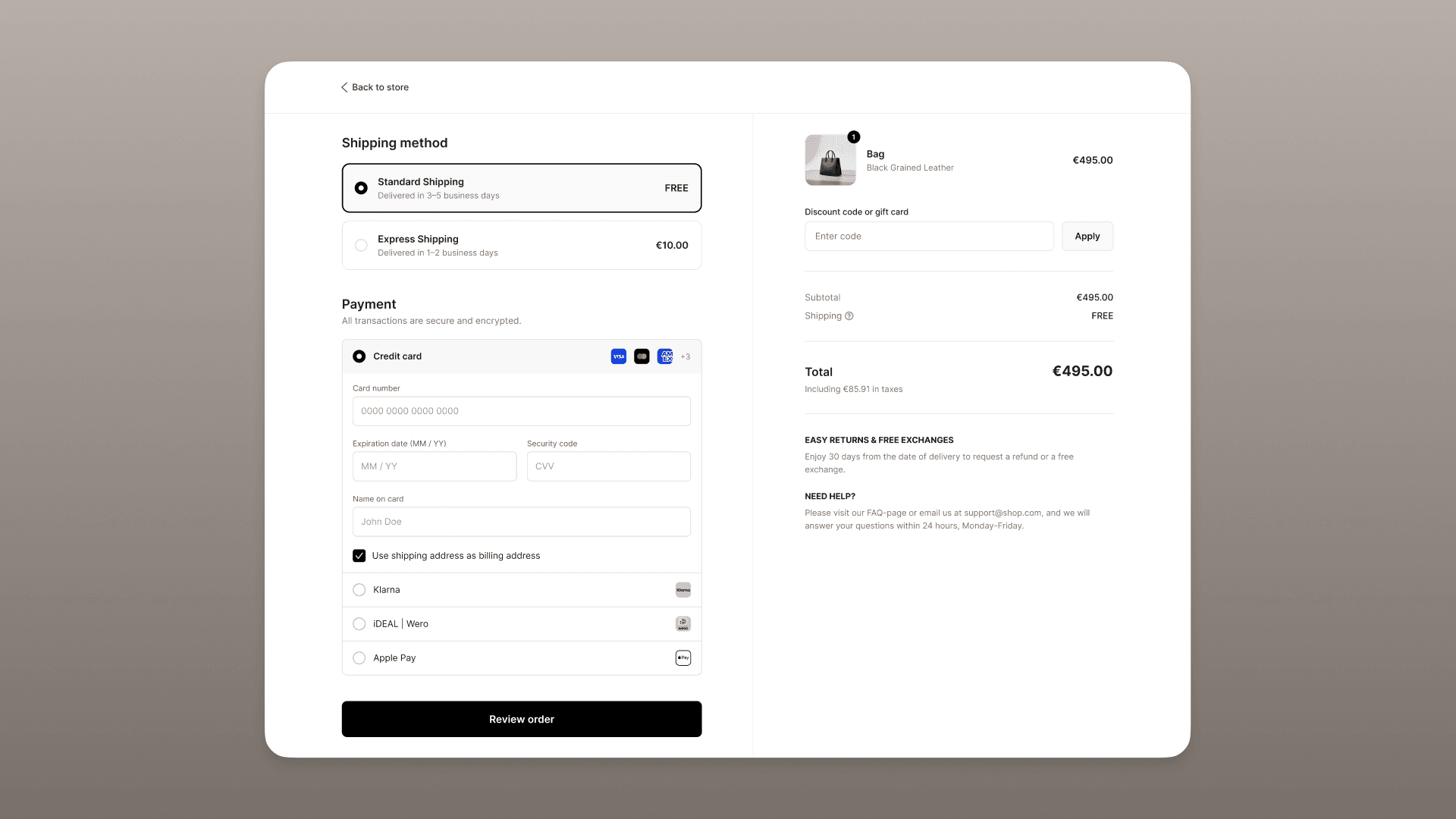
A direct gateway keeps payment selection and card entry inside your own checkout. Your customer doesn’t need to open a new tab or enter their card details on an unfamiliar page before they’ve even chosen how to pay. Depending on the payment method itself, there may still be a further step outside your site, a bank authentication screen for a bank transfer, for example, but that’s a requirement of the method, not something a direct gateway adds on top.

Here’s the part that businesses often miss: with most plugins, the redirect happens before the customer has even chosen how they want to pay. Your branding disappears along with your URL, and your customer is handed over to a third party right when they need to trust you the most.

With a plugin like Mollie, payment selection and card entry happen inside your WooCommerce checkout. For some cards and Apple Pay, the payment completes without any page transition.  

Checkout window

The real difference is when your customer leaves your store: with a redirect provider, it’s before they’ve paid. With Mollie, any redirect only happens at the step that the payment method itself requires, such as bank authentication for bank transfer payments, not before your customer has even chosen how to pay.

2. Does the plugin support WooCommerce block checkout?

WooCommerce made block-based checkout the default for new stores in November 2023. The classic, shortcode-based checkout still works, but it’s in maintenance mode.

That means every new checkout capability WooCommerce ships lands on blocks first, so a payment plugin that only works for the old checkout falls further behind with each release.

A good plugin, like Mollie’s, supports block checkout through a native integration with the block API, so you get the checkout experience WooCommerce is steering everyone towards, without relying on a workaround that could break at any moment.

3. Does it show the right payment methods to each customer?

The best payment setup shows customers the methods they actually prefer. Get that right, and shoppers are more likely to complete their purchase. Get it wrong, and unfamiliar or irrelevant payment options add friction at exactly the wrong moment.

Mollie lets you configure which payment methods to show based on a customer’s billing country. Once configured, the plugin applies those rules automatically, without requiring custom checkout logic.

4. Can customers use express checkout?

Express wallets like Apple Pay autofill a customer’s stored payment and shipping details, letting them skip the checkout form and complete a purchase in a few taps.

A good plugin should display Apple Pay on product and cart pages, so eligible customers can pay before your checkout form has even loaded.

5. Can it support your subscription model in the long term?

Stored card tokens and SEPA Direct Debit mandates are difficult to move between providers. If you do switch, every subscriber might have to re-authorise their payment details from scratch, which is a reliable way to lose a chunk of your customer base.

A good plugin supports WooCommerce Subscriptions natively: card customers renew on securely stored tokens, and customers who first pay through a supported method can be set up on a SEPA Direct Debit mandate for future charges. It’s worth settling this before launch rather than discovering it once you have subscribers to retain.

6. How are card details handled?

Not every plugin handles card details the same way.

Some route card data through the business's own server before it reaches the payment provider. Others use secure fields served directly from the provider’s domain, so raw card numbers never touch your systems.

For example, Mollie’s card fields run through secure iframes served from Mollie's domain. Card numbers, expiry dates and security codes never pass through your server, which helps limit your PCI DSS scope.

7. Will the provider be there when something goes wrong?

Payment methods and pricing get most of the attention, but two things matter just as much when you’re looking for a new plugin: what happens when something goes wrong, and how quickly you can start using it.

Look for support you can actually reach, tools that handle disputes and reconciliation without hours of manual admin, and a setup simple enough to manage yourself.

The best providers offer a real person to talk to in your own language, so that if there are ever any issues – or you just need some guidance – you have someone to contact. 

It’s easy to overlook this while comparing plugins on paper, but it’s usually the first thing businesses wish they’d checked once something goes wrong.

1. Does payment stay on your website?

There are two broad categories of payment gateway you can run on WooCommerce: redirect and direct.

A redirect gateway sends your customer away from your store to pay. They land on an external page, usually branded by your payment provider, complete the payment there, and are redirected back to your site when it’s done.

A direct gateway keeps payment selection and card entry inside your own checkout. Your customer doesn’t need to open a new tab or enter their card details on an unfamiliar page before they’ve even chosen how to pay. Depending on the payment method itself, there may still be a further step outside your site, a bank authentication screen for a bank transfer, for example, but that’s a requirement of the method, not something a direct gateway adds on top.

Here’s the part that businesses often miss: with most plugins, the redirect happens before the customer has even chosen how they want to pay. Your branding disappears along with your URL, and your customer is handed over to a third party right when they need to trust you the most.

With a plugin like Mollie, payment selection and card entry happen inside your WooCommerce checkout. For some cards and Apple Pay, the payment completes without any page transition.  

Checkout window

The real difference is when your customer leaves your store: with a redirect provider, it’s before they’ve paid. With Mollie, any redirect only happens at the step that the payment method itself requires, such as bank authentication for bank transfer payments, not before your customer has even chosen how to pay.

2. Does the plugin support WooCommerce block checkout?

WooCommerce made block-based checkout the default for new stores in November 2023. The classic, shortcode-based checkout still works, but it’s in maintenance mode.

That means every new checkout capability WooCommerce ships lands on blocks first, so a payment plugin that only works for the old checkout falls further behind with each release.

A good plugin, like Mollie’s, supports block checkout through a native integration with the block API, so you get the checkout experience WooCommerce is steering everyone towards, without relying on a workaround that could break at any moment.

3. Does it show the right payment methods to each customer?

The best payment setup shows customers the methods they actually prefer. Get that right, and shoppers are more likely to complete their purchase. Get it wrong, and unfamiliar or irrelevant payment options add friction at exactly the wrong moment.

Mollie lets you configure which payment methods to show based on a customer’s billing country. Once configured, the plugin applies those rules automatically, without requiring custom checkout logic.

4. Can customers use express checkout?

Express wallets like Apple Pay autofill a customer’s stored payment and shipping details, letting them skip the checkout form and complete a purchase in a few taps.

A good plugin should display Apple Pay on product and cart pages, so eligible customers can pay before your checkout form has even loaded.

5. Can it support your subscription model in the long term?

Stored card tokens and SEPA Direct Debit mandates are difficult to move between providers. If you do switch, every subscriber might have to re-authorise their payment details from scratch, which is a reliable way to lose a chunk of your customer base.

A good plugin supports WooCommerce Subscriptions natively: card customers renew on securely stored tokens, and customers who first pay through a supported method can be set up on a SEPA Direct Debit mandate for future charges. It’s worth settling this before launch rather than discovering it once you have subscribers to retain.

6. How are card details handled?

Not every plugin handles card details the same way.

Some route card data through the business's own server before it reaches the payment provider. Others use secure fields served directly from the provider’s domain, so raw card numbers never touch your systems.

For example, Mollie’s card fields run through secure iframes served from Mollie's domain. Card numbers, expiry dates and security codes never pass through your server, which helps limit your PCI DSS scope.

7. Will the provider be there when something goes wrong?

Payment methods and pricing get most of the attention, but two things matter just as much when you’re looking for a new plugin: what happens when something goes wrong, and how quickly you can start using it.

Look for support you can actually reach, tools that handle disputes and reconciliation without hours of manual admin, and a setup simple enough to manage yourself.

The best providers offer a real person to talk to in your own language, so that if there are ever any issues – or you just need some guidance – you have someone to contact. 

It’s easy to overlook this while comparing plugins on paper, but it’s usually the first thing businesses wish they’d checked once something goes wrong.

1. Does payment stay on your website?

There are two broad categories of payment gateway you can run on WooCommerce: redirect and direct.

A redirect gateway sends your customer away from your store to pay. They land on an external page, usually branded by your payment provider, complete the payment there, and are redirected back to your site when it’s done.

A direct gateway keeps payment selection and card entry inside your own checkout. Your customer doesn’t need to open a new tab or enter their card details on an unfamiliar page before they’ve even chosen how to pay. Depending on the payment method itself, there may still be a further step outside your site, a bank authentication screen for a bank transfer, for example, but that’s a requirement of the method, not something a direct gateway adds on top.

Here’s the part that businesses often miss: with most plugins, the redirect happens before the customer has even chosen how they want to pay. Your branding disappears along with your URL, and your customer is handed over to a third party right when they need to trust you the most.

With a plugin like Mollie, payment selection and card entry happen inside your WooCommerce checkout. For some cards and Apple Pay, the payment completes without any page transition.  

Checkout window

The real difference is when your customer leaves your store: with a redirect provider, it’s before they’ve paid. With Mollie, any redirect only happens at the step that the payment method itself requires, such as bank authentication for bank transfer payments, not before your customer has even chosen how to pay.

2. Does the plugin support WooCommerce block checkout?

WooCommerce made block-based checkout the default for new stores in November 2023. The classic, shortcode-based checkout still works, but it’s in maintenance mode.

That means every new checkout capability WooCommerce ships lands on blocks first, so a payment plugin that only works for the old checkout falls further behind with each release.

A good plugin, like Mollie’s, supports block checkout through a native integration with the block API, so you get the checkout experience WooCommerce is steering everyone towards, without relying on a workaround that could break at any moment.

3. Does it show the right payment methods to each customer?

The best payment setup shows customers the methods they actually prefer. Get that right, and shoppers are more likely to complete their purchase. Get it wrong, and unfamiliar or irrelevant payment options add friction at exactly the wrong moment.

Mollie lets you configure which payment methods to show based on a customer’s billing country. Once configured, the plugin applies those rules automatically, without requiring custom checkout logic.

4. Can customers use express checkout?

Express wallets like Apple Pay autofill a customer’s stored payment and shipping details, letting them skip the checkout form and complete a purchase in a few taps.

A good plugin should display Apple Pay on product and cart pages, so eligible customers can pay before your checkout form has even loaded.

5. Can it support your subscription model in the long term?

Stored card tokens and SEPA Direct Debit mandates are difficult to move between providers. If you do switch, every subscriber might have to re-authorise their payment details from scratch, which is a reliable way to lose a chunk of your customer base.

A good plugin supports WooCommerce Subscriptions natively: card customers renew on securely stored tokens, and customers who first pay through a supported method can be set up on a SEPA Direct Debit mandate for future charges. It’s worth settling this before launch rather than discovering it once you have subscribers to retain.

6. How are card details handled?

Not every plugin handles card details the same way.

Some route card data through the business's own server before it reaches the payment provider. Others use secure fields served directly from the provider’s domain, so raw card numbers never touch your systems.

For example, Mollie’s card fields run through secure iframes served from Mollie's domain. Card numbers, expiry dates and security codes never pass through your server, which helps limit your PCI DSS scope.

7. Will the provider be there when something goes wrong?

Payment methods and pricing get most of the attention, but two things matter just as much when you’re looking for a new plugin: what happens when something goes wrong, and how quickly you can start using it.

Look for support you can actually reach, tools that handle disputes and reconciliation without hours of manual admin, and a setup simple enough to manage yourself.

The best providers offer a real person to talk to in your own language, so that if there are ever any issues – or you just need some guidance – you have someone to contact. 

It’s easy to overlook this while comparing plugins on paper, but it’s usually the first thing businesses wish they’d checked once something goes wrong.

1. Does payment stay on your website?

There are two broad categories of payment gateway you can run on WooCommerce: redirect and direct.

A redirect gateway sends your customer away from your store to pay. They land on an external page, usually branded by your payment provider, complete the payment there, and are redirected back to your site when it’s done.

A direct gateway keeps payment selection and card entry inside your own checkout. Your customer doesn’t need to open a new tab or enter their card details on an unfamiliar page before they’ve even chosen how to pay. Depending on the payment method itself, there may still be a further step outside your site, a bank authentication screen for a bank transfer, for example, but that’s a requirement of the method, not something a direct gateway adds on top.

Here’s the part that businesses often miss: with most plugins, the redirect happens before the customer has even chosen how they want to pay. Your branding disappears along with your URL, and your customer is handed over to a third party right when they need to trust you the most.

With a plugin like Mollie, payment selection and card entry happen inside your WooCommerce checkout. For some cards and Apple Pay, the payment completes without any page transition.  

Checkout window

The real difference is when your customer leaves your store: with a redirect provider, it’s before they’ve paid. With Mollie, any redirect only happens at the step that the payment method itself requires, such as bank authentication for bank transfer payments, not before your customer has even chosen how to pay.

2. Does the plugin support WooCommerce block checkout?

WooCommerce made block-based checkout the default for new stores in November 2023. The classic, shortcode-based checkout still works, but it’s in maintenance mode.

That means every new checkout capability WooCommerce ships lands on blocks first, so a payment plugin that only works for the old checkout falls further behind with each release.

A good plugin, like Mollie’s, supports block checkout through a native integration with the block API, so you get the checkout experience WooCommerce is steering everyone towards, without relying on a workaround that could break at any moment.

3. Does it show the right payment methods to each customer?

The best payment setup shows customers the methods they actually prefer. Get that right, and shoppers are more likely to complete their purchase. Get it wrong, and unfamiliar or irrelevant payment options add friction at exactly the wrong moment.

Mollie lets you configure which payment methods to show based on a customer’s billing country. Once configured, the plugin applies those rules automatically, without requiring custom checkout logic.

4. Can customers use express checkout?

Express wallets like Apple Pay autofill a customer’s stored payment and shipping details, letting them skip the checkout form and complete a purchase in a few taps.

A good plugin should display Apple Pay on product and cart pages, so eligible customers can pay before your checkout form has even loaded.

5. Can it support your subscription model in the long term?

Stored card tokens and SEPA Direct Debit mandates are difficult to move between providers. If you do switch, every subscriber might have to re-authorise their payment details from scratch, which is a reliable way to lose a chunk of your customer base.

A good plugin supports WooCommerce Subscriptions natively: card customers renew on securely stored tokens, and customers who first pay through a supported method can be set up on a SEPA Direct Debit mandate for future charges. It’s worth settling this before launch rather than discovering it once you have subscribers to retain.

6. How are card details handled?

Not every plugin handles card details the same way.

Some route card data through the business's own server before it reaches the payment provider. Others use secure fields served directly from the provider’s domain, so raw card numbers never touch your systems.

For example, Mollie’s card fields run through secure iframes served from Mollie's domain. Card numbers, expiry dates and security codes never pass through your server, which helps limit your PCI DSS scope.

7. Will the provider be there when something goes wrong?

Payment methods and pricing get most of the attention, but two things matter just as much when you’re looking for a new plugin: what happens when something goes wrong, and how quickly you can start using it.

Look for support you can actually reach, tools that handle disputes and reconciliation without hours of manual admin, and a setup simple enough to manage yourself.

The best providers offer a real person to talk to in your own language, so that if there are ever any issues – or you just need some guidance – you have someone to contact. 

It’s easy to overlook this while comparing plugins on paper, but it’s usually the first thing businesses wish they’d checked once something goes wrong.

Consider switching provider?

Discover what switching your WooCommerce store would actually involve.

Why WooCommerce businesses use Mollie’s payment plugin

Businesses across Europe already run Mollie on WooCommerce to reduce checkout friction and support growth.

HomeWizard

HomeWizard, the Dutch energy-monitoring brand, expanded into 28 countries with a lean team, using WooCommerce storefronts and Mollie to handle payments in each new market.

“With WooCommerce and Mollie, rolling out to a new country is as simple as checking a few boxes. That ease of use is everything for our growth.” – Maurice van Wieringen, HomeWizard

Berry Boards

Berry Boards makes custom footboards for electric scooters and is run by founder Mick Berry. When his previous payment software stopped supporting WooCommerce, he switched to Mollie to bring every payment method under one integration.

“I thought it’d just be better to get everything under one provider so I don't have to worry about integrating so many different things. With Mollie, you can simply add and remove payment options with a click." – Mick Berry, founder and CEO, Berry Boards

Ernest Wright

Ernest Wright, the 120-year-old Sheffield scissor-maker, sells to customers in 80 countries. Reaching those markets means offering the payment methods each one uses. Co-owner Paul Jacobs helps to do that with Mollie’s WooCommerce integration, which he’s since reused across six other webshops.

“Mollie is very modern, but also has a personal touch. And the personal touches for me are much more important than the last penny.” – Paul Jacobs, co-owner, Ernest Wright

Businesses across Europe already run Mollie on WooCommerce to reduce checkout friction and support growth.

HomeWizard

HomeWizard, the Dutch energy-monitoring brand, expanded into 28 countries with a lean team, using WooCommerce storefronts and Mollie to handle payments in each new market.

“With WooCommerce and Mollie, rolling out to a new country is as simple as checking a few boxes. That ease of use is everything for our growth.” – Maurice van Wieringen, HomeWizard

Berry Boards

Berry Boards makes custom footboards for electric scooters and is run by founder Mick Berry. When his previous payment software stopped supporting WooCommerce, he switched to Mollie to bring every payment method under one integration.

“I thought it’d just be better to get everything under one provider so I don't have to worry about integrating so many different things. With Mollie, you can simply add and remove payment options with a click." – Mick Berry, founder and CEO, Berry Boards

Ernest Wright

Ernest Wright, the 120-year-old Sheffield scissor-maker, sells to customers in 80 countries. Reaching those markets means offering the payment methods each one uses. Co-owner Paul Jacobs helps to do that with Mollie’s WooCommerce integration, which he’s since reused across six other webshops.

“Mollie is very modern, but also has a personal touch. And the personal touches for me are much more important than the last penny.” – Paul Jacobs, co-owner, Ernest Wright

Businesses across Europe already run Mollie on WooCommerce to reduce checkout friction and support growth.

HomeWizard

HomeWizard, the Dutch energy-monitoring brand, expanded into 28 countries with a lean team, using WooCommerce storefronts and Mollie to handle payments in each new market.

“With WooCommerce and Mollie, rolling out to a new country is as simple as checking a few boxes. That ease of use is everything for our growth.” – Maurice van Wieringen, HomeWizard

Berry Boards

Berry Boards makes custom footboards for electric scooters and is run by founder Mick Berry. When his previous payment software stopped supporting WooCommerce, he switched to Mollie to bring every payment method under one integration.

“I thought it’d just be better to get everything under one provider so I don't have to worry about integrating so many different things. With Mollie, you can simply add and remove payment options with a click." – Mick Berry, founder and CEO, Berry Boards

Ernest Wright

Ernest Wright, the 120-year-old Sheffield scissor-maker, sells to customers in 80 countries. Reaching those markets means offering the payment methods each one uses. Co-owner Paul Jacobs helps to do that with Mollie’s WooCommerce integration, which he’s since reused across six other webshops.

“Mollie is very modern, but also has a personal touch. And the personal touches for me are much more important than the last penny.” – Paul Jacobs, co-owner, Ernest Wright

Businesses across Europe already run Mollie on WooCommerce to reduce checkout friction and support growth.

HomeWizard

HomeWizard, the Dutch energy-monitoring brand, expanded into 28 countries with a lean team, using WooCommerce storefronts and Mollie to handle payments in each new market.

“With WooCommerce and Mollie, rolling out to a new country is as simple as checking a few boxes. That ease of use is everything for our growth.” – Maurice van Wieringen, HomeWizard

Berry Boards

Berry Boards makes custom footboards for electric scooters and is run by founder Mick Berry. When his previous payment software stopped supporting WooCommerce, he switched to Mollie to bring every payment method under one integration.

“I thought it’d just be better to get everything under one provider so I don't have to worry about integrating so many different things. With Mollie, you can simply add and remove payment options with a click." – Mick Berry, founder and CEO, Berry Boards

Ernest Wright

Ernest Wright, the 120-year-old Sheffield scissor-maker, sells to customers in 80 countries. Reaching those markets means offering the payment methods each one uses. Co-owner Paul Jacobs helps to do that with Mollie’s WooCommerce integration, which he’s since reused across six other webshops.

“Mollie is very modern, but also has a personal touch. And the personal touches for me are much more important than the last penny.” – Paul Jacobs, co-owner, Ernest Wright

Assess the plugin, not only the price

Fees and payment methods are usually where the comparison starts when deciding on the right provider, and they matter. But your plugin shapes what happens at checkout, right when your customer decides to buy, and it deserves the same scrutiny as everything else there.

Run your current plugin through the seven questions above. If it falls short on more than one, that’s worth exploring properly, not filing away for later.

At Mollie, we build WooCommerce payments around exactly these gaps. That includes:

  • Over 35 local and global payment methods

  • A direct checkout with secure, embeddable card fields

  • Chargebacks, re-orders and cancellations managed through the Mollie Dashboard, not a spreadsheet

  • Transparent pricing with no lock-in contracts

  • Multilingual support, with a real person when you need one

  • Payment management through the Mollie Dashboard

  • Native subscription management with WooCommerce Subscriptions

  • Native WooCommerce Blocks support

  • Country-based payment method display, configurable by the business.

Already processing payments through another provider? Contact Mollie to talk through what switching your WooCommerce store would actually involve.

Want more stories like these? Browse our WooCommerce success stories to see why businesses choose Mollie for their webshops.

Fees and payment methods are usually where the comparison starts when deciding on the right provider, and they matter. But your plugin shapes what happens at checkout, right when your customer decides to buy, and it deserves the same scrutiny as everything else there.

Run your current plugin through the seven questions above. If it falls short on more than one, that’s worth exploring properly, not filing away for later.

At Mollie, we build WooCommerce payments around exactly these gaps. That includes:

  • Over 35 local and global payment methods

  • A direct checkout with secure, embeddable card fields

  • Chargebacks, re-orders and cancellations managed through the Mollie Dashboard, not a spreadsheet

  • Transparent pricing with no lock-in contracts

  • Multilingual support, with a real person when you need one

  • Payment management through the Mollie Dashboard

  • Native subscription management with WooCommerce Subscriptions

  • Native WooCommerce Blocks support

  • Country-based payment method display, configurable by the business.

Already processing payments through another provider? Contact Mollie to talk through what switching your WooCommerce store would actually involve.

Want more stories like these? Browse our WooCommerce success stories to see why businesses choose Mollie for their webshops.

Fees and payment methods are usually where the comparison starts when deciding on the right provider, and they matter. But your plugin shapes what happens at checkout, right when your customer decides to buy, and it deserves the same scrutiny as everything else there.

Run your current plugin through the seven questions above. If it falls short on more than one, that’s worth exploring properly, not filing away for later.

At Mollie, we build WooCommerce payments around exactly these gaps. That includes:

  • Over 35 local and global payment methods

  • A direct checkout with secure, embeddable card fields

  • Chargebacks, re-orders and cancellations managed through the Mollie Dashboard, not a spreadsheet

  • Transparent pricing with no lock-in contracts

  • Multilingual support, with a real person when you need one

  • Payment management through the Mollie Dashboard

  • Native subscription management with WooCommerce Subscriptions

  • Native WooCommerce Blocks support

  • Country-based payment method display, configurable by the business.

Already processing payments through another provider? Contact Mollie to talk through what switching your WooCommerce store would actually involve.

Want more stories like these? Browse our WooCommerce success stories to see why businesses choose Mollie for their webshops.

Fees and payment methods are usually where the comparison starts when deciding on the right provider, and they matter. But your plugin shapes what happens at checkout, right when your customer decides to buy, and it deserves the same scrutiny as everything else there.

Run your current plugin through the seven questions above. If it falls short on more than one, that’s worth exploring properly, not filing away for later.

At Mollie, we build WooCommerce payments around exactly these gaps. That includes:

  • Over 35 local and global payment methods

  • A direct checkout with secure, embeddable card fields

  • Chargebacks, re-orders and cancellations managed through the Mollie Dashboard, not a spreadsheet

  • Transparent pricing with no lock-in contracts

  • Multilingual support, with a real person when you need one

  • Payment management through the Mollie Dashboard

  • Native subscription management with WooCommerce Subscriptions

  • Native WooCommerce Blocks support

  • Country-based payment method display, configurable by the business.

Already processing payments through another provider? Contact Mollie to talk through what switching your WooCommerce store would actually involve.

Want more stories like these? Browse our WooCommerce success stories to see why businesses choose Mollie for their webshops.

FAQs: WooCommerce payment plugins

How long does it take to set up Mollie for WooCommerce?

Most merchants install the plugin and go live within a short setup window, following our getting started guide. No custom development needed for standard use cases. Larger or more complex stores may need a bit more time to configure, so it's worth checking the guide against your own setup before you commit to a launch date.

How can I connect Mollie to my WooCommerce store?

Connecting Mollie to your WooCommerce store takes a few steps:

  1. Create your free Mollie account.

  2. Install the Mollie Payments for WooCommerce plugin from your WordPress dashboard.

  3. Connect your store using your test API key from the Mollie Dashboard.

  4. Follow the setup guide to configure and test your payments.

  5. Add your live API key and activate your payment methods in Mollie to start selling.

For the full walkthrough, read our WooCommerce documentation.

Do I need a separate Mollie account to use the plugin?

Yes. You’ll need a Mollie account alongside the WooCommerce plugin itself. You can set one up during installation and connect it directly from your WordPress dashboard, so it’s one extra step, not a separate project.

Can I test the plugin before going live?

Yes. Mollie supports test payments, so you can run your full checkout flow before switching your store over to live transactions. Worth doing properly rather than skipping to save time, since this is the step that catches configuration issues before customers do.

Which payment methods does Mollie support on WooCommerce?

A wide range, including iDEAL, Bancontact, cards, Apple Pay, Klarna and SEPA Direct Debit, among others. Exactly which methods you can offer depends on your Mollie account and the markets you sell into, so check your dashboard for the current list rather than assuming every method is available everywhere.

Does the plugin work with WooCommerce Subscriptions?

Yes, natively. Mollie integrates with WooCommerce Subscriptions to support recurring payments by card and by SEPA Direct Debit mandate, with no separate subscriptions add-on to configure.

What happens if I switch from another provider to Mollie?

You’ll need to reconnect stored payment methods and subscription mandates, because these generally can't transfer directly between providers. That's not a Mollie limitation; it’s how card networks and mandates work everywhere. If you have an active subscriber base, talk to our team early so you can plan the transition properly rather than mid-billing-cycle.

How long does it take to set up Mollie for WooCommerce?

Most merchants install the plugin and go live within a short setup window, following our getting started guide. No custom development needed for standard use cases. Larger or more complex stores may need a bit more time to configure, so it's worth checking the guide against your own setup before you commit to a launch date.

How can I connect Mollie to my WooCommerce store?

Connecting Mollie to your WooCommerce store takes a few steps:

  1. Create your free Mollie account.

  2. Install the Mollie Payments for WooCommerce plugin from your WordPress dashboard.

  3. Connect your store using your test API key from the Mollie Dashboard.

  4. Follow the setup guide to configure and test your payments.

  5. Add your live API key and activate your payment methods in Mollie to start selling.

For the full walkthrough, read our WooCommerce documentation.

Do I need a separate Mollie account to use the plugin?

Yes. You’ll need a Mollie account alongside the WooCommerce plugin itself. You can set one up during installation and connect it directly from your WordPress dashboard, so it’s one extra step, not a separate project.

Can I test the plugin before going live?

Yes. Mollie supports test payments, so you can run your full checkout flow before switching your store over to live transactions. Worth doing properly rather than skipping to save time, since this is the step that catches configuration issues before customers do.

Which payment methods does Mollie support on WooCommerce?

A wide range, including iDEAL, Bancontact, cards, Apple Pay, Klarna and SEPA Direct Debit, among others. Exactly which methods you can offer depends on your Mollie account and the markets you sell into, so check your dashboard for the current list rather than assuming every method is available everywhere.

Does the plugin work with WooCommerce Subscriptions?

Yes, natively. Mollie integrates with WooCommerce Subscriptions to support recurring payments by card and by SEPA Direct Debit mandate, with no separate subscriptions add-on to configure.

What happens if I switch from another provider to Mollie?

You’ll need to reconnect stored payment methods and subscription mandates, because these generally can't transfer directly between providers. That's not a Mollie limitation; it’s how card networks and mandates work everywhere. If you have an active subscriber base, talk to our team early so you can plan the transition properly rather than mid-billing-cycle.

How long does it take to set up Mollie for WooCommerce?

Most merchants install the plugin and go live within a short setup window, following our getting started guide. No custom development needed for standard use cases. Larger or more complex stores may need a bit more time to configure, so it's worth checking the guide against your own setup before you commit to a launch date.

How can I connect Mollie to my WooCommerce store?

Connecting Mollie to your WooCommerce store takes a few steps:

  1. Create your free Mollie account.

  2. Install the Mollie Payments for WooCommerce plugin from your WordPress dashboard.

  3. Connect your store using your test API key from the Mollie Dashboard.

  4. Follow the setup guide to configure and test your payments.

  5. Add your live API key and activate your payment methods in Mollie to start selling.

For the full walkthrough, read our WooCommerce documentation.

Do I need a separate Mollie account to use the plugin?

Yes. You’ll need a Mollie account alongside the WooCommerce plugin itself. You can set one up during installation and connect it directly from your WordPress dashboard, so it’s one extra step, not a separate project.

Can I test the plugin before going live?

Yes. Mollie supports test payments, so you can run your full checkout flow before switching your store over to live transactions. Worth doing properly rather than skipping to save time, since this is the step that catches configuration issues before customers do.

Which payment methods does Mollie support on WooCommerce?

A wide range, including iDEAL, Bancontact, cards, Apple Pay, Klarna and SEPA Direct Debit, among others. Exactly which methods you can offer depends on your Mollie account and the markets you sell into, so check your dashboard for the current list rather than assuming every method is available everywhere.

Does the plugin work with WooCommerce Subscriptions?

Yes, natively. Mollie integrates with WooCommerce Subscriptions to support recurring payments by card and by SEPA Direct Debit mandate, with no separate subscriptions add-on to configure.

What happens if I switch from another provider to Mollie?

You’ll need to reconnect stored payment methods and subscription mandates, because these generally can't transfer directly between providers. That's not a Mollie limitation; it’s how card networks and mandates work everywhere. If you have an active subscriber base, talk to our team early so you can plan the transition properly rather than mid-billing-cycle.

How long does it take to set up Mollie for WooCommerce?

Most merchants install the plugin and go live within a short setup window, following our getting started guide. No custom development needed for standard use cases. Larger or more complex stores may need a bit more time to configure, so it's worth checking the guide against your own setup before you commit to a launch date.

How can I connect Mollie to my WooCommerce store?

Connecting Mollie to your WooCommerce store takes a few steps:

  1. Create your free Mollie account.

  2. Install the Mollie Payments for WooCommerce plugin from your WordPress dashboard.

  3. Connect your store using your test API key from the Mollie Dashboard.

  4. Follow the setup guide to configure and test your payments.

  5. Add your live API key and activate your payment methods in Mollie to start selling.

For the full walkthrough, read our WooCommerce documentation.

Do I need a separate Mollie account to use the plugin?

Yes. You’ll need a Mollie account alongside the WooCommerce plugin itself. You can set one up during installation and connect it directly from your WordPress dashboard, so it’s one extra step, not a separate project.

Can I test the plugin before going live?

Yes. Mollie supports test payments, so you can run your full checkout flow before switching your store over to live transactions. Worth doing properly rather than skipping to save time, since this is the step that catches configuration issues before customers do.

Which payment methods does Mollie support on WooCommerce?

A wide range, including iDEAL, Bancontact, cards, Apple Pay, Klarna and SEPA Direct Debit, among others. Exactly which methods you can offer depends on your Mollie account and the markets you sell into, so check your dashboard for the current list rather than assuming every method is available everywhere.

Does the plugin work with WooCommerce Subscriptions?

Yes, natively. Mollie integrates with WooCommerce Subscriptions to support recurring payments by card and by SEPA Direct Debit mandate, with no separate subscriptions add-on to configure.

What happens if I switch from another provider to Mollie?

You’ll need to reconnect stored payment methods and subscription mandates, because these generally can't transfer directly between providers. That's not a Mollie limitation; it’s how card networks and mandates work everywhere. If you have an active subscriber base, talk to our team early so you can plan the transition properly rather than mid-billing-cycle.

More updates

Stay up to date

Never miss an update. Receive product updates, news and customer stories right into your inbox.

Form fields

Table of contents

Table of contents

Partner featured

MollieGrowthHow to choose a WooCommerce payment plugin that drives conversion